Showing posts with label Computers. Show all posts

Wednesday, August 17, 2011

Down the Tubes! But in a fun way

Every once in a while you come across something really cool on the web that makes you enjoy it again like it was a brand new toy. Today I’m grovin’ on Yahoo Pipes.

image

Yahoo Pipes is a mashup tool that lets you take data from all sorts of different sources and bring them together to create custom content. This can be for your personal site, blog, twitter, whatever you want. It’s actually not to hard to do.

Now, I approached it with my typical “get your hands dirty” approach and tried creating my own weather feed pipe. I was successful but am having a problem getting it to update one of my twitter accounts so I decided I better read up and actually learn some things about it before going any farther.

I also found an actual application you can use to create pipes on your desktop and not be stuck with Yahoo. This is good for those companies that don’t want to have any sensitive data potentially slipping through. It’s called DERI Pipes and can be found here. I’ll play with this after I get a good grasp on Yahoo pipes.

Off to go play Mario, well not the actual game but with Yahoo Pipes! I’ll keep you all informed and you may see some of my pipes here!

Thursday, August 11, 2011

Being Social but Also Being Safe

Recently there has been a lot of chatter about how the social network Facebook is displaying all of your contacts.

The Post floating around…

“THE PHONE NUMBERS IN YOUR PHONE are now on Facebook! Click on ACCOUNT, click on EDIT FRIENDS, left side of screen and click CONTACTS. You will see all phone numbers (FB friends or not) are published that you have stored in your mobile phone. TO REMOVE, go to Right column, click on "this page," then click "remove" Please repost this on your status, so your friends can remove their #'s and thus prevent abuse if they don't want them published!”

In response, Facebook posted this

“Rumors claiming that your phone contacts are visible to everyone on Facebook are false. Our Contacts list, formerly called Phonebook, has existed for a long time. The phone numbers listed there were either added by your friends themselves and made visible to you, or you have previously synced your phone contacts with Facebook. Just like on your phone, only you can see these numbers.”

I hate to tell you but Facebook is correct. This feature has been there for quite some time. I’ve been on Facebook for about 2 years now and it was there when I started. It’s an automatic feature and you as the user must disable it.

Now I can understand why everyone is getting upset, your mobile phone number is a personal thing. You like to consider it “private" information” just like what you enter on social networks like Facebook, twitter, LinkedIn, ect.

Social networks are just that, social. If you look up the word social in the dictionary you see,

“pertaining to, devoted to, or characterized by friendly companionship or relations: a social club.” (taken from dictionary.com)

it’s you and all of your family, friends or peers gathered in one location. Facebook is the biggest one and has done wonders for people reconnecting with one another. The idea behind Facebook is just that, make a place that’s easy for you to connect with everyone and maybe make some new connections. Since it’s a “social” environment, this would include various ways to contact each other, email, through Facebook itself, by postal mail or phone.

How all this came to fruition is smart phones. We love them and we hate them and in some case they are smarter than their owners and in this case they are. If you have a smart phone like an Android, iPhone, Windows 7 phone and you connect to Facebook or any other social network on your phone through an app, it will ask you if you want to import your contacts. Most people just click ok all the way through so they can get started using it. This is where the “security breach” happens. The user fails to stop and think about what they are doing or about to do and just wants to get to their shiny new toy. 

This is where you the user of these services need to really focus and pay attention. By default, Facebook and most other social sites leave certain options open to help with integration and networking which includes importing your contact information.

What the people posting this are not fully aware of and just being sheep and following the paranoia is that those numbers are only visible to you, not anyone else. Try it, go to any of your friends sites and try to find their list of numbers, you won’t be able to. These numbers are for your eyes only. You can still remove them if you wish.

The biggest thing to take away from this is that you and you alone are responsible for your own safety and security. Do not rely on someone else to do it for you, if you do then you will fail. Take the time to read the information presented to you. Take the time and go through security settings BEFORE you allow any integrations, take the time to understand how something works. You’ll have plenty of time to play with your new shiny toy and after taking the time to properly set it up and protect what you want to protect, it will be a very enjoyable experience.

Tuesday, June 28, 2011

I HATE VIRUSES!

Unfortunately I’m not talking about the kind you actually get as a human but the ones for the PC.

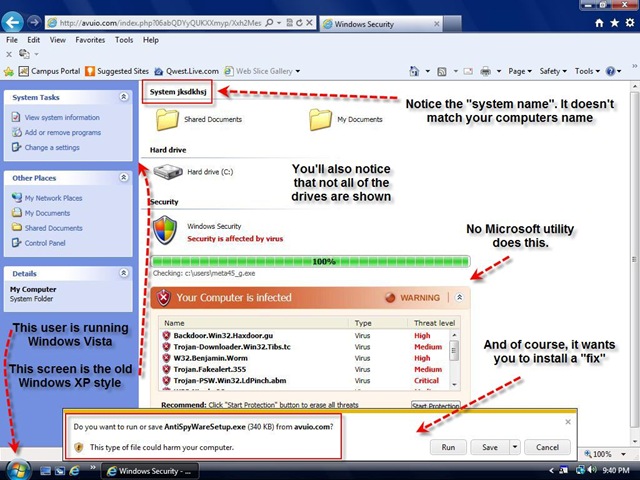
Recently my wife was researching some stuff on the CBS Reality Show Big Brother and stumbled across a site that had, in my opinion, the worst of them all. It comes disguised under the following titles Windows Antivirus, AntiSpyWare (like in this example) Win Antivirus, Antivirus Pro, Antivirus Pro 2009, Antivirus Pro 2010 and I think there is an Antivirus Pro 2011.

Its “M.O.” is to pose as an antivirus application from Microsoft and scare you into thinking you have a gazillion viri and malware. I will give the designers credit as they have done a pretty good job of making it look like a Microsoft product, complete with drive icons and everything.

pitavirus1

As you can see from the screen shot above, there are ways to tell that this is not your antivirus application warning you.

“Why didn’t my antivirus or anti-malware program detect this?” Good question. It’s basically a simple web page designed to look like your system. Anyone can make a page like this and run either javascript or VBscript in the background which controls the scary warning stuff. This is not technically a “virus”. However, if you download the so called “fix” and install it, you’re now infected.

“Ok, so I panicked and downloaded and installed the virus. What can I do to get rid of it?”

Just follow these steps. (More detailed guide at bleepingcomputer.com)

  1. Don’t panic
  2. Immediately download (if you don’t already have them) MalwareBytes and CCleaner.
  3. Unplug your computer from any network connections
  4. Install MalwareBytes and CCleaner
  5. Run your regular antivirus application on a FULL SCAN
  6. Don’t panic
  7. Let your regular antivirus program do its cleaning.
  8. Install MallwareBytes and CCleaner
  9. Run MalwareBytes and let it do its cleaning
  10. Run CCleaner’s Registry portion. Don’t worry, it’s safe.
  11. Restart your PC
  12. Repeat steps 5 through11 if necessary

This should have removed it completely. This virus is really a PITA! (Pain In The ASS!) It has a bad habit of leaving little files on your system which re-installs it upon the next boot.

As far as I know, MalwareBytes is about the best tool to remove this virus. CCleaner is great for the “followup” in removing any registry files that may get left behind. With some calm nerves and a little determination, you can avoid getting this thing and if you do, you can remove it with confidence.

Thursday, June 16, 2011

If the tech world ended, what would you do?

I was talking to a friend the other day and he was telling me about how he would like to start doing some leatherworking. No, not the stuff in World of Warcraft but the real type of leatherworking. I mentioned to him that I have a box of leatherworking tools somewhere in my garage and he’s more than welcome to them as I don’t really see myself doing anything with them anytime soon.

This, along with some recent events in the technology world got me to thinking. What would happen if we lost all of our high tech gadgets and technology? Now I know what you’re thinking, “Oh jeez, another one of these survivalist nuts.” but hold on, I’m not really one of those guys, I do think its good to have some skills and things to fall back on but seriously, what would todays world do if we lost our internet, computers, TV and other things?

Not to long ago our local Wal*Mart had a major failure in it’s point of sale system. They were unable to process any purchases for well over 2 hours. Now you old timers would simply say to just take cash and finish the sale, well that’s easier said than done. They weren’t even able to get into the registers not to mention most of the cashiers probably didn’t know how to count or make change. Not really their fault but today’s technology has virtually eliminated this skill.

As some of you may already know, one of my hobbies is woodworking. I’m mostly focused on learning hand tools and joinery. Nothing wrong with power tools but thousands of years ago they didn’t have power tools and all that really beautiful old furniture or buildings had to be made somehow. This could be something I could fall back on if all of today’s technology was lost.

So what “old world” skill do you have? Have you participated in it lately? Are you teaching younger members of your family your skill?

Friday, June 3, 2011

HP Discover 2011–Get ready

Well I got approved to go to HP Discover 2011 this year and I have to say I’m really excited to go. I’ve got my schedule all filled up with the most prominent events and sessions related to HP Quality Center and ALM v11.

DiscoverBanner

Its funny because it’s in Vegas this year and everyone is thinking I’m going to have all this fun. Actually I won’t be. Well, I’ll be having fun in the sense of learning as much as I can about Quality Center, upgrading to ALM and getting a chance to talk to other Quality Center admins and sharing our failures and successes of administrating Quality Center and attempting to achieve my certifications in Quality center and QuickTest Pro.

las_vegas_sign

As for Vegas, Nah, I’m not going to have much time for anything outside of the conference. My schedule is pretty much booked up from 8:00AM to 9:00PM plus I promised my wife I wouldn’t have any fun since she can’t be there. (although I am going to Margaritaville! SHHHHH! Don’t say anything though!) We didn’t get to go when we got married last year and that was one of the only places I wanted to go.

margaritaville

besides that one of the things I’m looking forward to is participating in the Vivit Tweetup on Tuesday night at the Triple Crown Event.

triple_crown_logo_small

Not to mention the blogging I’ll be doing from there. So if you want to follow along then follow me on twitter @b4d93r and once I get the info on the blogging I’ll post that. I believe it will be on the HP Community Forums but I’m not sure. However I will have updates of the days events on my personal blog right here.

Saturday, February 5, 2011

Technology is great

Welcome to the chkdsk/f blog. What's this blog about? Pretty simple, it my outlook on technology for the everyday user.
You'll find topics ranging from my thoughts on tech to how to examples. I believe that technology is a good thing, at least until it develops self awareness and takes over. I also believe that just about everyone can work with and integrate technology into their lives. For example this blog entry was done from my new Droid phone.


So sit back, relax, pour yourself some coffee and enjoy. Don't forget to leave feedback or your tips on the various topics.